• +33.3.20.25.71.70
  • information@mandarine.academy
mandarine academy logo
  • Nos offres
    • Mandarine Adoption
    • Mandarine LMS
    • Mandarine AI
    • Mandarine Catalog
    • Mandarine for Teams
    • Mandarine Planner
  • Nos formations
    • Formations Microsoft 365
      • Formations Excel
      • Formations Teams
      • Formations SharePoint
      • Formations OneDrive
      • Formations Power Bi
      • Formations Outlook
      • Formations Word
      • Formations PowerPoint
      • Formations Planner
      • Formations Power Platform
      • Formations Viva
      • Formations OneNote
      • Formations Microsoft 365 Copilot
      • Cours thรฉmatiques
      • Autres formations
      • Cours mรฉtiers
    • Formations IA
      • Formations IA gรฉnรฉrative
      • Formations Copilot
      • Cours mรฉtiers IA
    • Formations Cybersรฉcuritรฉ
      • Formations cybersรฉcuritรฉ
    • Formations Soft Skills
      • Nos formation sur lโ€™efficacitรฉ relationnelle & Bien-รชtre au travail
      • Nos formation sur lโ€™excellence organisationnelle & efficience collective
      • Nos formation sur lโ€™intelligence collaborative & dynamiques dโ€™innovation
      • Soft-skills & Usages
    • Formation RSE
      • Formations RSE
      • Formations Numรฉrique Responsable
      • Formations Numรฉrique Responsable dans les applications Microsoft 365
    • Formations Business Central
    • Formations dรฉdiรฉes
  • Intelligence Artificielle
    • Mandarine et lโ€™IA
    • Utilisateurs
      • Mandarine AI
      • Mandarine AI Tutor
      • Mandarine AI Recommandation
    • Gestionnaires
      • Mandarine AI
      • Mandarine AI Tutor
      • Mandarine LMS & Ciblage
      • Mandarine AI Content
    • Concepteurs
      • Mandarine AI Tutor
      • Mandarine Creator
    • Microsoft Ai Skills Fest
    • Osez lโ€™IA en entreprise
  • Nos expertises
    • Microsoft 365
    • Intelligence Artificielle
    • RSE
    • Cybersรฉcuritรฉ
    • Logiciels mรฉtiers
    • Formation en visioconfรฉrence
    • La mรฉthode PROSCI
    • Microsoft Training Services Partner
  • Nos clients
    • Secteur public
    • Grands Groupes
    • PME
    • ETI
    • Autres
  • Nos missions
    • Qui sommes-nous ?
    • Pourquoi Mandarine Academy
    • Notre investissement dans la R&D
    • Lutte contre l’illectronisme
    • Nous rejoindre
  • Nos ressources
    • Blog
    • Livres blancs
    • Presse
    • MandaWiki
  • Nous contacter
  • Nos offres
    • Mandarine Adoption
    • Mandarine LMS
    • Mandarine AI
    • Mandarine Catalog
    • Mandarine for Teams
    • Mandarine Planner
  • Nos formations
    • Formations Microsoft 365
      • Formations Excel
      • Formations Teams
      • Formations SharePoint
      • Formations OneDrive
      • Formations Power Bi
      • Formations Outlook
      • Formations Word
      • Formations PowerPoint
      • Formations Planner
      • Formations Power Platform
      • Formations Viva
      • Formations OneNote
      • Formations Microsoft 365 Copilot
      • Cours thรฉmatiques
      • Autres formations
      • Cours mรฉtiers
    • Formations IA
      • Formations IA gรฉnรฉrative
      • Formations Copilot
      • Cours mรฉtiers IA
    • Formations Cybersรฉcuritรฉ
      • Formations cybersรฉcuritรฉ
    • Formations Soft Skills
      • Nos formation sur lโ€™efficacitรฉ relationnelle & Bien-รชtre au travail
      • Nos formation sur lโ€™excellence organisationnelle & efficience collective
      • Nos formation sur lโ€™intelligence collaborative & dynamiques dโ€™innovation
      • Soft-skills & Usages
    • Formation RSE
      • Formations RSE
      • Formations Numรฉrique Responsable
      • Formations Numรฉrique Responsable dans les applications Microsoft 365
    • Formations Business Central
    • Formations dรฉdiรฉes
  • Intelligence Artificielle
    • Mandarine et lโ€™IA
    • Utilisateurs
      • Mandarine AI
      • Mandarine AI Tutor
      • Mandarine AI Recommandation
    • Gestionnaires
      • Mandarine AI
      • Mandarine AI Tutor
      • Mandarine LMS & Ciblage
      • Mandarine AI Content
    • Concepteurs
      • Mandarine AI Tutor
      • Mandarine Creator
    • Microsoft Ai Skills Fest
    • Osez lโ€™IA en entreprise
  • Nos expertises
    • Microsoft 365
    • Intelligence Artificielle
    • RSE
    • Cybersรฉcuritรฉ
    • Logiciels mรฉtiers
    • Formation en visioconfรฉrence
    • La mรฉthode PROSCI
    • Microsoft Training Services Partner
  • Nos clients
    • Secteur public
    • Grands Groupes
    • PME
    • ETI
    • Autres
  • Nos missions
    • Qui sommes-nous ?
    • Pourquoi Mandarine Academy
    • Notre investissement dans la R&D
    • Lutte contre l’illectronisme
    • Nous rejoindre
  • Nos ressources
    • Blog
    • Livres blancs
    • Presse
    • MandaWiki
  • Nous contacter
Demandez votre dรฉmo

Mandarine LMS

11
  • Introduction Mandarine LMS
  • Expรฉrience utilsateur
    • Mandarine AI : recommandation
    • Mandarine AI Tutor – Mandarine Academy
  • Gestion des utilisateurs
    • Gestion des accรจs
    • Gestion des profils
  • Communications
    • Gestion des communications
  • Personnalisation
    • SEO dโ€™un site
    • Mandarine AI Content
    • Personnalisation graphique
    • Pages et Bloc HTML
      • Disposition des pages
      • Structure des pages

Nos catalogues de formations elearning

5
  • Export des cours pour intรฉgration dans votre LMS :
  • Catalogue de formations Microsoft 365
  • Catalogue de formations en Cybersรฉcuritรฉ
  • Catalogue de formations en Intelligence Artificielle
  • Catalogue de formations RSE

Applications

1
  • Mandarine for Teams
View Categories
  • Home
  • MandaWiki
  • Applications
  • Mandarine for Teams

Tรฉlรฉchargement de l’application #

Cliquez ici pour tรฉlรฉcharger l’application Mandarine for Teams

Installation de l’application #

1- Depuis l’interface de votre application Microsoft Teams. #

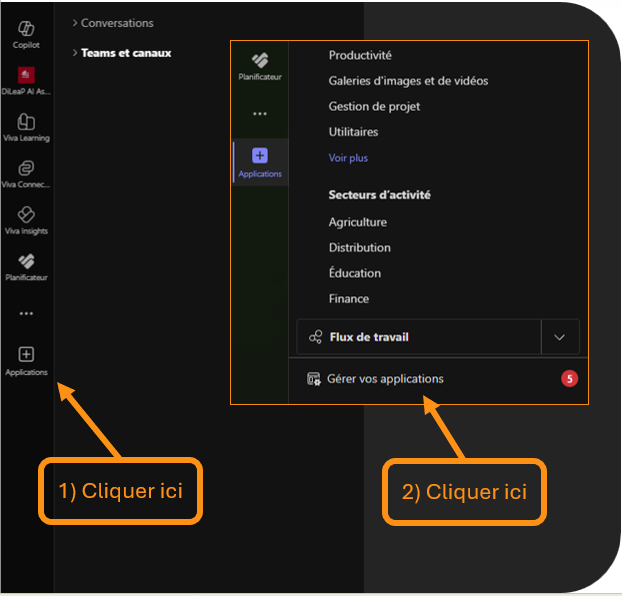
  • En bas du menu de navigation ร  gauche, cliquer sur le bouton ยซ Applications ยป
  • Le menu entourรฉ en orange ci-contre devrait apparaitre, vous pouvez cliquer sur le bouton en bas ยซ Gรฉrer vos applications ยป

Point dโ€™attention :

  • Lโ€™administrateur du contrat Microsoft 365 de votre organisation peut avoir limitรฉ lโ€™accรจs ร  ce menu.
  • Il faudra dans ce cas vous rapprocher de lโ€™รฉquipe informatique.

2- Depuis lโ€™interface ยซ Gรฉrer vos applications ยป #

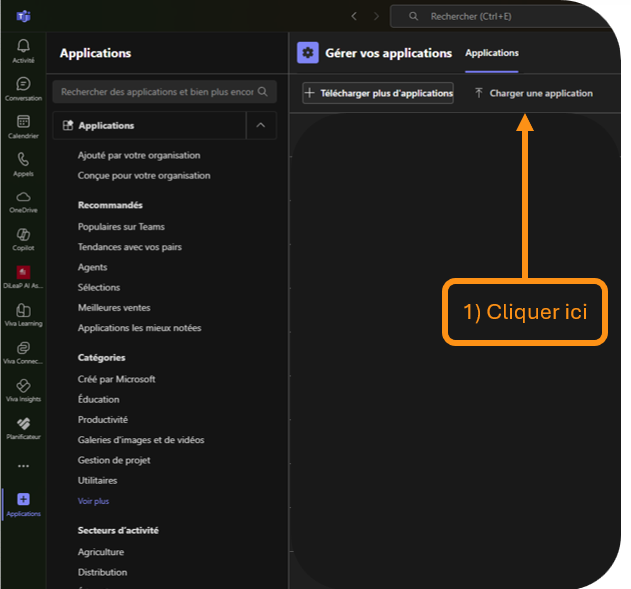
  • En bas du menu de navigation ร  gauche, cliquer sur le bouton ยซ Applications ยป
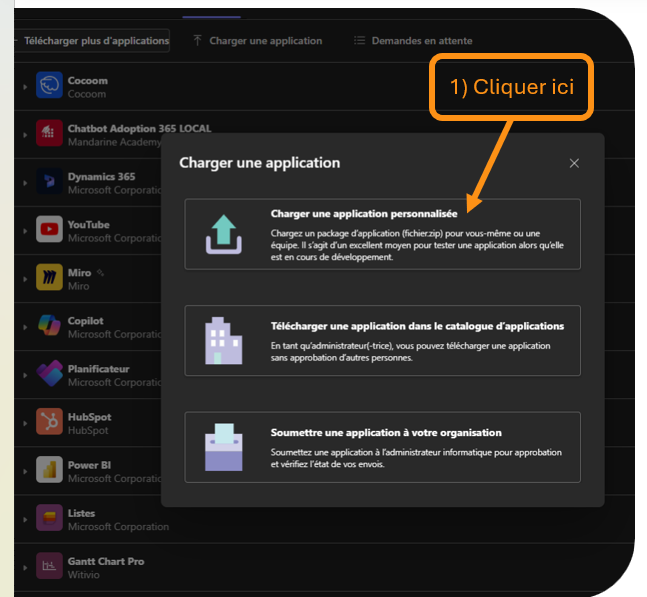
  • Une pop-up sโ€™affiche avec 3 modalitรฉs de chargement sโ€™affiche

Point dโ€™attention :

  • Lโ€™administrateur du contrat Microsoft 365 de votre organisation peut avoir limitรฉ lโ€™accรจs ร  ce menu.
  • Il faudra dans ce cas vous rapprocher de lโ€™รฉquipe informatique.

  • Choisir ยซ Charger une application personnalisรฉe ยป
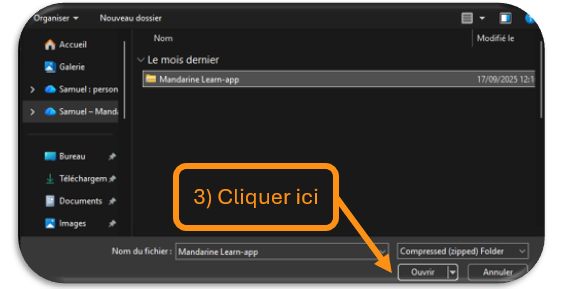
  • Lโ€™application vous invite ร  rรฉcupรฉrer le fichier ยซ Zip ยป, tรฉlรฉchargรฉ prรฉcรฉdemment.
  • Une fois sรฉlectionnรฉ, cliquer sur ยซ Ouvrir ยป
Cliquez ici pour tรฉlรฉcharger l’application Mandarine for Teams

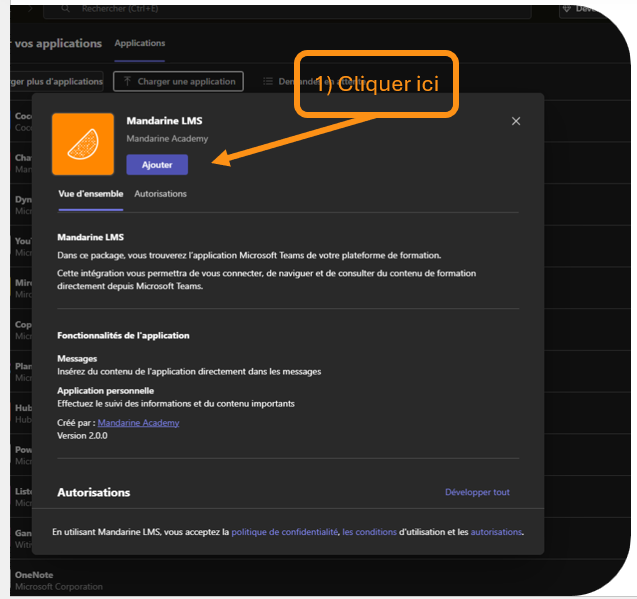
Toujours depuis lโ€™interface ยซ Gรฉrer vos applications ยป

  • Une fois lโ€™application retrouvรฉe, cliquer sur le bouton ยซ Ajouter ยป
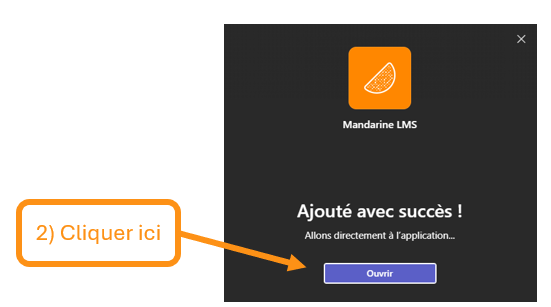
  • Une fois lโ€™ajout validรฉ, le message suivant sโ€™affiche. Cliquer sur ยซ Ouvrir ยป pour afficher lโ€™application

Ouvrir l’application #

1- Depuis lโ€™interface de votre application Microsoft Teams #

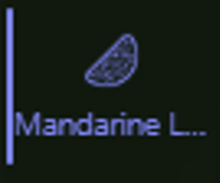
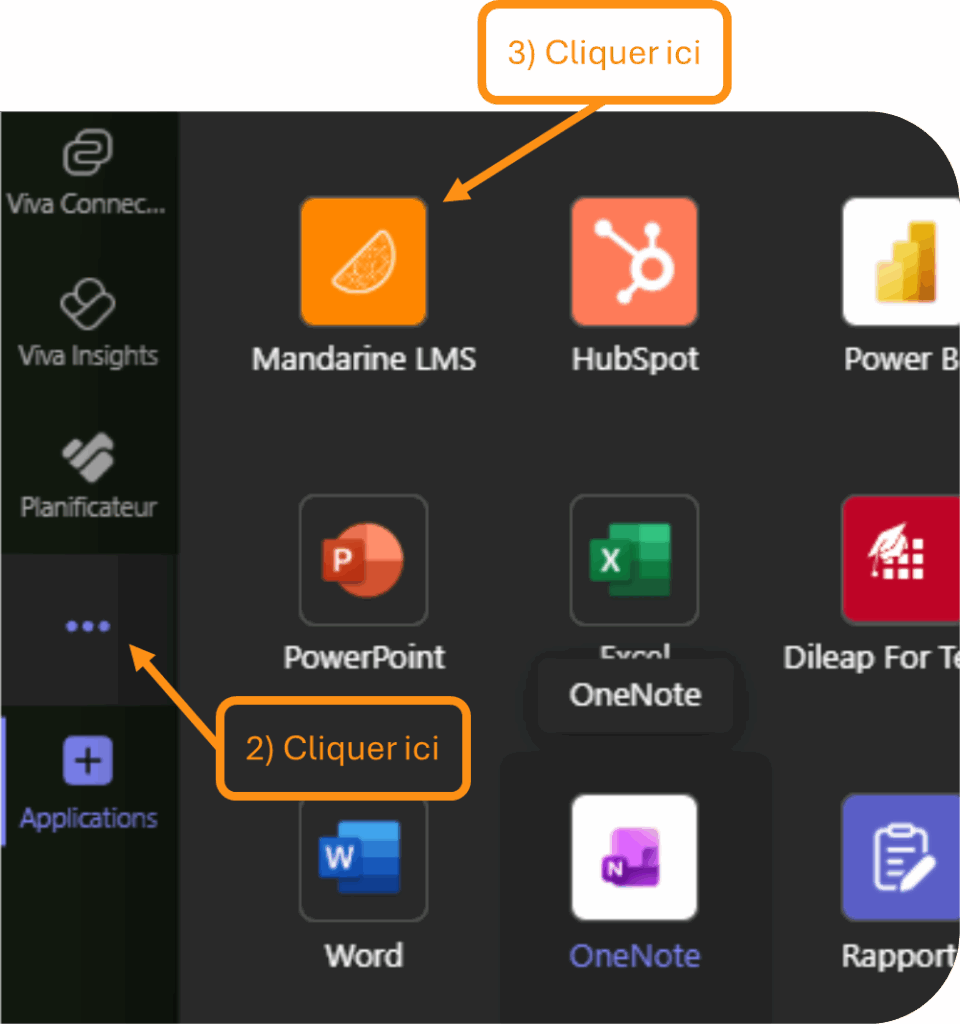
  • Depuis lโ€™application Microsoft Teams, vous retrouverez en bas ร  gauche lโ€™icรดne suivante :
  • Si elle nโ€™apparait pas, lโ€™icรดne pourra รชtre retrouvรฉe grรขce aux ยซ โ€ฆ ยป en bas ร  gauche du menu.
  • Lโ€™application sera visible et sรฉlectionnable

Point dโ€™attention :

  • Lโ€™administrateur du contrat Microsoft 365 de votre organisation peut avoir une approbation ร  valider avant lโ€™utilisation de lโ€™application.
  • Il faudra dans ce cas vous rapprocher de lโ€™รฉquipe informatique.

Se connecter ร  l’application #

Depuis lโ€™interface de votre application Microsoft Teams #

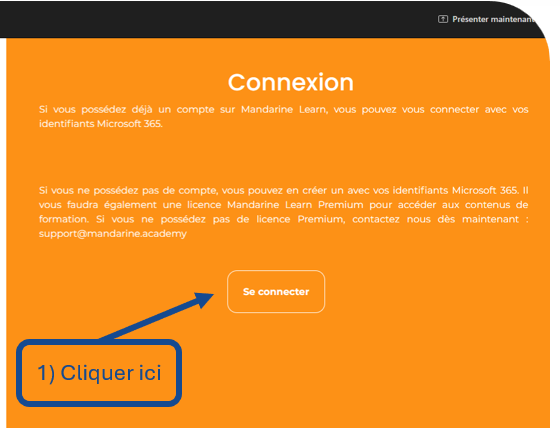
  • Pour accรฉder au contenu du portail de formation depuis Microsoft Teams, la connexion sera nรฉcessaire
  • A la premiรจre connexion, il est possible quโ€™une saisie de login/mot de passe soit demandรฉ: il sโ€™agit de lโ€™authentification par votre compte Microsoft 365 (messagerie).
  • Un bandeau vous confirmera la bonne connexion via votre compte

Naviguer dans l’application #

Depuis lโ€™interface de votre application Microsoft Teams #

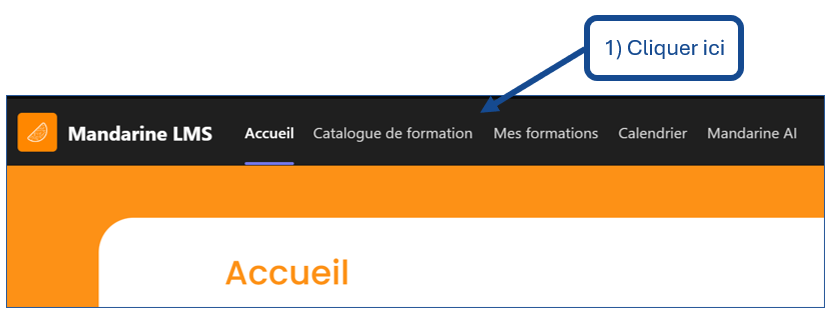
  • Vous pouvez dรฉsormais naviguer dans lโ€™interface de lโ€™application Mandarine Academy depuis Microsoft Teams.
  • Le menu de navigation se trouve en haut de lโ€™interface
Mandarine for TeamsMandarine for Teams
Table des Matiรจres
  • Tรฉlรฉchargement de l'application
  • Installation de l'application
    • 1- Depuis l'interface de votre application Microsoft Teams.
    • 2- Depuis lโ€™interface ยซย Gรฉrer vos applicationsย ยป
  • Ouvrir l'application
    • 1- Depuis lโ€™interface de votre application Microsoft Teams
  • Se connecter ร  l'application
    • Depuis lโ€™interface de votre application Microsoft Teams
  • Naviguer dans l'application
    • Depuis lโ€™interface de votre application Microsoft Teams

Partagez cet article :

  • Facebook
  • X
  • LinkedIn
  • Pinterest
NOS OFFRES
  • Mandarine adoption
  • Mandarine LMS
  • Mandarine catalog
  • Mandarine for teams
  • Mandarine planner
  • Mandarine ai
NOS FORMATIONS
  • Formations Microsoft 365
  • Formations IA
  • Formations RSE
  • Formations Cybersรฉcuritรฉ
  • Formations Soft Skills
NOS EXPERTISES
  • Microsoft 365
  • Intelligence Artificielle
  • RSE - Numรฉrique responsable
  • Cybersรฉcuritรฉ
  • Logiciels mรฉtiers
  • Formations en visio
  • La mรฉthode PROSCI
A PROPOS
  • Nos clients
  • Qui sommes-nous ?
  • contactez-nous
NOUS TROUVER

1 bis Rue de Versailles, 59650 Villeneuve-d’Ascq

Vous รชtes en situation de handicap ?
Contactez nous pour en savoir plus sur lโ€™accessibilitรฉ de nos formations au 03.20.25.71.70

  • mentions lรฉgales
  • - CGVU
  • ยฉ Copyright 2026
  • Mandarine Academy
  • - Tous droits rรฉservรฉs